Many of your customers in the Let's Ride Challenge™ Ride For Heroes will want to register and log miles on more than one Harley-Davidson® motorcycle. Below is a video outlining the process. If you'd prefer a written step-by-step instead of video, just scroll down.
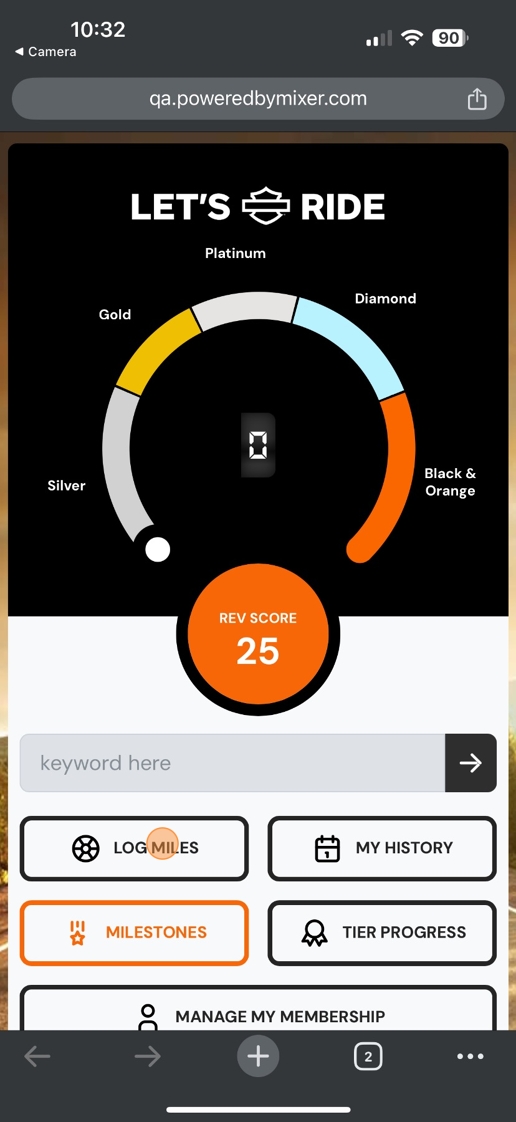
1. From the customer's dashboard, tap "Log Miles."
2. On this screen, you'll see any previously added VINs. To add a new VIN, tap "Add motorcycle."

3. Answer the three questions (rider/passenger, own/rent, miles/kilometers), and then input the model year of the motorcycle you wish to add.

4. Input the VIN and then tap "Submit."

5. Review the submission. If everything looks good, tap "Looks good". If changes are needed, tap "I need to change something."

6. Input the current odometer reading for the newly added motorcycle.

7. Review the mileage and confirm it's correct.

8. A validator is now required to confirm everything. If prompted, allow access to the device's camera and scan a validator's QR code.

9. The validator screen opens. Please review the VIN. If you see green, as pictured below, the NHTSA likes the VIN, but please put your own eyes on it and confirm it matches the VIN on the motorcycle.
If so, click "Confirm". If it doesn't, tap "I need to make changes."

10. Input the current odometer reading.

11. Tap "Verify".

12. Note that the newly added motorcycle now appears in the customer's list of "My Motorcycles."

Comments
0 comments
Please sign in to leave a comment.